Sunday, April 1, 2007

So, I'm building some Modula MTs

The RS150/Neo3 project I'm working on is of massive scale - I'm trying some techniques for cabinet damping that can give all the benifits of open-baffle speakers without any of the disadvantages. Needless to say, this will not work properly at all, and in the two years I'm liable to spend making these work, odds are I'll want something to listen to in the interim.

Enter the Modula MT.
Photo and awesome instructions courtsey of :
http://mysite.verizon.net/res6vgmm/danspage/id8.html

The Modulas are pretty much standard-issue 2-ways - one woofer, one tweeter. However, they're notable because they feature some of the "Refrence" series of drivers from Parts Express' Dayton house-brand of drivers. The tweeters, made by Usher, share many design aspects with Scan-Speak tweeters costing triple the price, and the same goes for the aluminum-coned woofers, which are almost as good as the Seas Excel series of metal-cone woofers.


While not exactly anything fancy, the Modulas are a solid design using parts that, if the testing data is accurate, are better than they have any right to be. They're simple, too - while not exactly foolproof, they're much less finnecky than transmission lines or horns, and the design is not complex. The parts are easily purchased from one place, too, and there are many guides to their construction , such as Dan's excellent blog (shown above).

While I'm not nearly in the same class as Dan for woodworking ability, I hope to offer something even more valuable: Step-by-step instructions on construction, and tips on cutting the costs down from his hefty $300 total. While I'm cheating (I'm buying some spare drivers from assorted people for only $125 total) a bit, I hope to keep the total cost at a very reasonable $175 or less.

Link

What to look for in a pair of speakers.

First, much apologies for the lack of a Saturday article. My bad.

Anyway, most people don't want to build a pair of speakers themselves. For some, it's too daunting a task; others don't have the time and energy or simply have no place to do so.

Well, there's no shortage of commercial speaker offerings, some better than others. But what to look for?

1. Weight. While hardly an accurate measure of quality, a speaker with thin walls, cheaply-made drivers, small magnets, and a simple crossover will weigh much less than a well-made speaker. If you can comfortably juggle speakers, they're probbably not very good.

2. Driver type. Cheap speakers often use mylar speaker cones, and have obviously shoddy construction from a cursory glance. Better speakers generally use drivers made by major OEMs, or in-house drivers of obviously good quality.

Things that should be looked for are proper dome tweeters instead of mylar or piezo tweeters, and quality-looking woofers - it's not hard to tell the difference with the grille off. Remember, paper-cone drivers aren't necessarily better than aluminum- or kevlar-coned drivers - just different.

In addition, many cheap speakers will often use a single driver. While functional, these speakers are generally inferior to proper 2-way designs, and I do not reccomend them.

3. Cabinet resonance. If the cabinet is poorly made and resonates like a drum, it will give sub-par performance. Conversely, a well-made, well-braced cabinet can positively affect sound quality.

4. Sound quality. If you don't like the speakers, you don't like the speakers - they won't magically sound better with more expensive wire, or a new reciever. Just because a speaker costs more or is "better rated" does not mean you will enjoy it more than a less expensive speakers.


And now for a few tips on buying speakers:

1. Bring your own CD. Many vendors - especially Bose - will use CDs especially tailored to bring out the best in their speakers. Your own music, however, may bring out faults, like rough frequency response or low-quality bass, which are disguised by the salesmen. If your choice of test music uses very high and very low frequencies, so much the better.

2. Test in your own environment. If you're using speakers in a tiny room, they'll sound very different from in a huge concert hall - and vice versa. Wall-mounting speakers can vastly alter frequency response, as can using different types of stands.

3. Compare directly. An A-B speaker switchbox can be had for $12 at RadioShack, and will let you compare directly one variety of speaker against another. Many vendors allow in-home trials, and this is a good way to compare one speaker against another.

4. Ignore the manufacturer entirely. It's easy to be swayed by slick marketing and fancy design, but a good, solid 2-way will often come out on top in the end. Remember, it's not what's "best" that matters, but what you enjoy listening to the most.

A few brands which I can reccomend:

-Paradigm. They have a well-deserved repuation for solidly-built speakers at a reasonable pricetag. The Paradigm Atoms are not the most attractive speakers, but they use good-quality woofers, tweeters, and crossovers, making them superior to speakers far more expensive - you can't go wrong with Atoms.

-AV123. This is a vendor of high-end speakers good for both home-theater and music, most notably the $1,800 a pair Strata Mini, a 3-way planar-hybrid with integrated subwoofer. While not cheap, you get what you pay for.

-Bowers and Wilkins. Strictly speaking, this old-school manufacturer started making monitors for the BBC, and have been in the buisness longer than just about anyone. While nothing they make is strictly speaking bad, all of it tends to be very expensive - the 800 series will cost you almost as much as a small car.

-Hsu Research. While their HT speakers are nothing special, the Hsu line of subwoofers are very well made, and not unreasonably priced.

-Velodyne. Another good manufacturer of subwoofers.

Friday, March 30, 2007

Connections for Dummies

There are many varieties of connections between audio components. Some are better than others, and while they may look similar, it's important to know the difference. Using the wrong connection between audio components, also called an "interconnect", will cause a loss of signal due to impeadance mismatch at best, and at worst cause damage to one or both components.

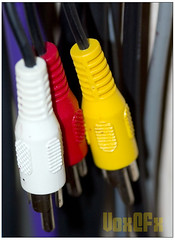
The most common type of connection is between "line-level" components, and usually uses RCA plugs. These connections are ordinary sine waves with an amplitude of roughly one volt, though in car audio equipment this may vary. These are basic connections which take analog audio - usually before volume adjustment, and are sometimes used for video, too, as is shown in the left/right/video "composite" connection shown below. (Red is almost always right, white is almost always left, and yellow is almost always a TV connection - though they're all the same cable.)

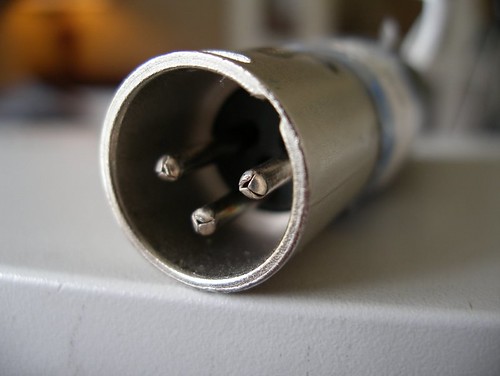
In addition, there are also "balanced" connections, which feature two leads and a ground, usually intertwined. Because the two "hot" leads are exactly out of phase, any RF is almost entirely cancelled out. For this reason, balanced connections are very popular for "pro" audio usage and in cars. These usually use a three-connection XLR plug.


Another type of common connection is the S/PDIF digital audio link. S/PDIF is the traditional format of connection between digital audio components and DACs, and can carry multiple channels of audio with a single cable. It's generally advised to use one of these to connect your DVD player to your home-theater reciever, and they're the method of choice for the use of external DACs with a CD player (in this case, you bypass the internal DAC in order to use one of higher quality.)

While S/PDIF uses RCA plugs, the cable itself has a different impeadance, and so it is strongly reccomended that you do not use a normal RCA interconnect for S/PDIF connections. The impeadance mismatch will cause signal loss, which will lower the quality of a digital connection.

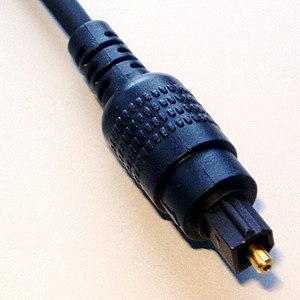
Digital audio in S/PDIF format may also be transferred through an optical connection, often called a Toslink connection. These are featured most commonly on Sony audio equipment - most notably MiniDisc players - and the Apple G5 and Mac Pro.


While functionally the same, digital optical cables have a few advantages and disadvantages. First, because they use light instead of electricity, they're totally immune to RF noise, such as that produced in an engine. However, the optical cable, made of glass or plastic, is much more fragile than a stranded copper-wire cable, and if the ends become scuffed or dirty on either the jacks or the plugs, it will cease to function properly. In addition, these cables are generally a good bit more expensive than S/PDIF cables.

And remember, folks - you might just find me on Speakchat.

Thursday, March 29, 2007

Digital audio and you.

Most CD players sound like junk compared to a good turntable, it's true. They're noisy, fuzzy, and just plain unpleasant.

But that's not because of the quality of compact-disk audio. It's because of the player.

Contrary to popular belief, not all CD players are created equal. Unlike a turntable, which converts vibration in the stylus - through a sort of microphone - into an electrical signal, a CD player instead must deal with a constant input of digital data which must be converted to analog in real-time. Most CD players have three parts: The transport, or pickup; the digital-to-analog converter, or DAC, and the output stage. The transport is a mechanical device containing a motor to spin the disc and a laser to read the CD; the DAC turns the digital signal into audio, and the output stage sets the gain and output impeadance to more usable levels.

The first source of problems is often within the optical pickup on the transport. Each "stripe" of data on a CD is only a fraction of a millimeter wide, and the laser which reflects off of it must be very precisely placed. If the laser pickup is unable to read parts of the CD, that data - and hence, music - is lost.
While a CD player is able to by design able to "smooth over" any missing data, large holes will in turn result in reduced quality. While this is not a problem for most modern CD players, a cheap transport in a cheap CD player (not necessarily an old one) will reduce sound quality.

The most common problem, however, is with the DAC. Digital audio is converted using Nyquist's Sampling Theorem, which essentially states that an analog signal can be turned into data by taking its level on a regular basis. Compact disc audio is 16-bit, and hence has 65,536 possible output levels, which are varied between to create an analog signal. The signal changes level over 44 thousand times per second. Both of these are in excess of what most people can discern - but this is meaningless if not all of it is used.

One of the most common tricks for lowering the price of a DAC is "oversampling". By sampling the frequency twice as fast, it's possible to replicate a voltage at double the actual level of resolution (say, 1.5 volts ) by quickly switching between 1 and 2 volts at double the normal sampling speed. While this can do good things for signal quality for high-quality DACs that oversample at an effective 20 bits (standard 16 bits - but eight times as fast!), many cheap DACs are often just 12-bit DACs set to oversample to an effective 16 bits.

In addition to oversampling, some DACs are simply of low quality. These DACs use poor-quality parts or inferior design, and simply do not sound very good. As a rule of thumb, cheap electronics have poor-quality DACs, while better-quality electronics have better-quality DACs. There are many different varieties, though Texas Instruments makes some of the best.


While even relatively inexpensive transports often are more than adequate, built-in DACs are often of low quality in many CD players. AS a result, many CD players sport external S/PDIF digital audio connections for use with recievers that have on-board DACs, or discrete DAC modules. If you have an older-model CD player, an external DAC may be a valuable upgrade.

Finally, it is hard to ignore the output electronics. Some CD players use cheap op-amps and low-quality power filtering, while others use high-quality op-amps and well-filtered power to reduce noise and hum. While it's generally unnecessary to purchase an external power conditioner, a cheap CD player will often pick up more noise than a well-made player.

Wednesday, March 28, 2007

Yet More Helpful Links

Well, I'm in a bit of a crunch, as I need to finish some papers to turn in before the end of the quarter. Hence, more semi-lame filler. More verbose audio goodness should, however, follow after the break.

The following are excellent places to visit if you need help with speakers and audio, and I highly suggest you check them out.

1. Speakchat
Speakchat.net is home of the Speakchat java chatroom. (It's not actually IRC, if you're wondering.) While not the most popular of chatrooms, it's the hangout of a few extremely knowledgable individuals, including WmAx and AndyG. Just click the "chat" button in the upper left, and you're done!

2.DIYaudio
The DIYaudio forums have been for years a major center of all DIY audio building and design. Wether you're into single-driver speakers or complex class-A solid-state amplifers, you'll find a variety of experts on it here. Also featured is a sub-forum dedicated to the excellent work of Nelson Pass, who himself posts there on a regular basis.

3. Audiokarma
Audiokarma is the home of a lot of old-school audio enthusiasts. If you want information on your vintage Halfler amp or need to repair your Pioneer HPM-100's, this is the place to go. It's also a frugal audiophile's paradise - with a little work and combing of Goodwill stores, it's possible to get stereo equipment superior to that sold at Best Buy for a fraction of the price.

4.DIYmobileaudio
DIY Mobile Audio is the hangout of car-audio enthusiasts who do it the right way: using high-quality drivers and custom crossovers. If you want to get a serious sound system in your car without a massive drain on your wallet, this is the place to do it.

5.Parts Express "Tech Talk"
While less formal than the more complex bulletin-board system employed by the other listed forums, Tech Talk is a useful resource nonetheless. If you need a quick question answered - or just want to look at other people's designs - this is a great place to go. Also easily found is information on Parts Express' clearance drivers, and assorted very inexpensive speaker designs based around them.

Finally, feel free to E-mail me any questions you may have. I'm still learning as I go along, but I'll help to the best of my ability.


Tuesday, March 27, 2007

And now, my first original speaker design!

I recently snagged a pair of Neo3PDR tweeters for $60. While the Cryolites are supposed to be excellent, I'd like to go for something a shade smaller.

As a result, I'm going for the Dayton RS150 woofers and active 8th-order crossovers, courtsey of a pair of Alesis amplifier modules. Distortion should be even lower than the Cryolites, and thanks to the impressive off-axis performance of the RS150 and Neo3PDR, I won't need to worry much about a "sweet spot".

To go with them, I'll hopefully get a subwoofer of some sort. The end result will, hopefully, be a system I won't want to upgrade anytime soon.

(Yes, I'm lazy and not posting much today. I need to go to bed.)

Monday, March 26, 2007

So, what's this amplifier jargon mean?

Amplifiers are a vital component - while the loudspeaker reproduces the sound with a varying degree of accuracy, a speaker can only be as accurate as the signal sent to it. While there are an endless supply of meaningless buzz-words attached to almost all amplifiers, there are meaningful numbers as well.

Perhaps the most commonly flaunted number is "watts RMS". This is, very simply, a measure of power - in other words, what would happen if the signal were rectified to DC from an AC sine wave, and the wattage (volts multiplied by ampres) were measured. While there are several other forms of measurement also employed today, such as "music power" or "PMPO", these are almost always meaningless, and should be treated as marketing baloney.

An amplifier's RMS output is usually stated at a given impeadance - for example, 120w into 8 ohms, or 200w into 4 ohms. This is basic electronic physics - current is equal to the voltage divided by impeadance (ohms), and if a given voltage is applied to half the impeadance, the resulting current - and hence, wattage - will double. This only occurs in the best of amplifiers, though: with the exception of some massive Nelson Pass designs, inefficiency and internal resistance within the amplifier - if not simply the internal power supply - will limit output to a bit less than double.

Some cheaply-made amplifiers are only capable of driving an 8-ohm load. While it's usually safe to use them with a 6-ohm load (common on some home-theater speakers), a 4-ohm load will cause too much current to flow through the output transistors on the amplifer - which will, in turn, cause it to overheat and die.

As much as it is flaunted, raw power is not a measure of quality. Much like speaker drivers, amplifiers also have a measurement of distortion - but they must also include residual noise from the power supply and crosstalk. This is abbreviated to THD+N, and is the benchmark for audio quality.

However, there are several tricks in measurement to look out for. First, almost all but the highest-quality amplifiers distort more at higher frequencies; as such, the THD+N is measured at a very low frequency, and this may give misleading results - especially on some cheaply-made class-D amplifiers. Secondly, distortion will often increase as the power output increases - make sure that the THD+N rating is at no less than 1/10th the rated maximum output power, or roughly half maximum volume.